メインコンテンツにスキップ
リペアコミュニティに参加 - アカウントの作成

HP 15-ay052nr USB Port Replacement

必要な工具と部品

  1. HP 15-ay052nr USB Port Replacement, Battery: 手順 1、 1の画像 1
    • To protect the device and yourself, make sure your device is completely powered down before disassembling. Disconnect all external devices before starting any tear down process.

    • Turn the device and lay it upside-down on a flat surface so the base of the computer is facing upwards.

    FixBotに聞いてみる
  2. HP 15-ay052nr USB Port Replacement: 手順 2、 1の画像 1
    • Identify the two (2) sliding lock mechanisms on either side of the battery and slide them towards the center.

    • The sliders are located at the back of the device on the side where the display hinges are.

    • The slider closest to the optical drive (CD reader) clicks open but the opposite slider has a spring.

    FixBotに聞いてみる
  3. HP 15-ay052nr USB Port Replacement: 手順 3、 1の画像 1
    • Pull the battery slightly up and out to remove.

    • If the battery doesn't pop out, the sliders weren't pushed in far enough. Push the sliders towards the center until the battery pops out.

    FixBotに聞いてみる
  4. HP 15-ay052nr USB Port Replacement, Bottom Cover: 手順 4、 1の画像 1
    • Remove the rubber feet on the bottom of the device to access all the screws.

    • There are two rubber feet, one on each side of the battery compartment.

    FixBotに聞いてみる
  5. HP 15-ay052nr USB Port Replacement: 手順 5、 1の画像 1
    • Unscrew the twelve 9 mm JIS #0 screws on the back of the device.

    • Gently remove the optical drive (CD reader) to more easily separate the base.

    FixBotに聞いてみる
  6. HP 15-ay052nr USB Port Replacement: 手順 6、 1の画像 1
    • Unclip the keyboard surface from the base using an iFixit opening tool around the entire border.

    FixBotに聞いてみる
  7. HP 15-ay052nr USB Port Replacement: 手順 7、 1の画像 1
    • Separate the base of the computer from the component assembly.

    • The optical drive can be placed in the base where it corresponds to prevent misplacing it.

    FixBotに聞いてみる
  8. HP 15-ay052nr USB Port Replacement, USB Port: 手順 8、 1の画像 1
    • Remove the three 3mm JIS #0 screws from the hard drive.

    FixBotに聞いてみる
  9. HP 15-ay052nr USB Port Replacement: 手順 9、 1の画像 1
    • Unplug the hard drive and set aside.

    FixBotに聞いてみる
  10. HP 15-ay052nr USB Port Replacement: 手順 10、 1の画像 1
    • Disconnect the cable that is attached to the motherboard from the USB board.

    • The motherboard can be identified as the big blue board in the opposite side of the USB board we are replacing.

    FixBotに聞いてみる
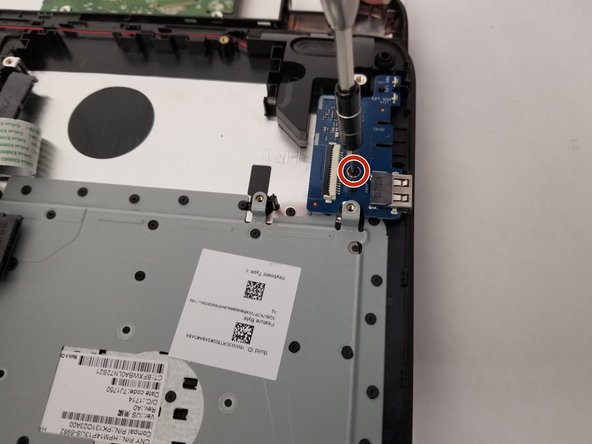
  11. HP 15-ay052nr USB Port Replacement: 手順 11、 1の画像 1
    • Remove the single 3mm JIS #0 screw.

    • Once the screw is out, the USB board can be pulled out for replacement.

    FixBotに聞いてみる
終わりに

To reassemble your device, follow these instructions in reverse order.

作成者

3人の作成者と共同で作成されました。

Morgan Distler

メンバー登録日: 01/10/19

914 ポイント

5のガイドは作成済み

チーム

0件のガイドコメント

コメントを追加

統計データ:

過去 24時間: 1

過去 7 日: 6

過去 30 日: 38

今までの合計 607