この翻訳は機械によって生成されたものであり、まだ人間による校正は行われていません。 日本語を話せますか? レビューはこちらから。
はじめに
マザーボードを交換する前に完了しておくべき作業があります。必須条件ガイドは修理ガイドで確認できます。
必要な工具と部品
-
-
-
-
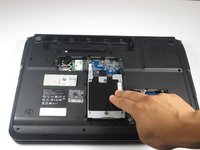
ハードドライブコンポーネントをコンパートメントから取り外します。コンポーネントをバッテリー筐体から離れる方向にスライドさせます。
-
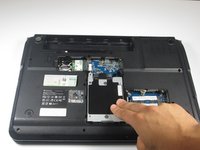
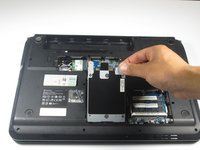
ハードドライブを90度まで持ち上げ、スロットから取り出します。
-
-
-
Wi-Fiカードに接続されている黒と白のケーブルの位置を確認します。
-
黒いケーブルをWi-Fiカードから外れるまでゆっくりと揺らします。
-
白いケーブルについても同様の手順を繰り返します。
-
-
-
-
バッテリーの下および上部両端にある、同じサイズの9/32インチプラスネジ(#0)を5本取り外す。
-
光学ドライブを固定している9/32インチプラスネジ(#0)を1本取り外す。
-
-
この手順で使用する道具:Heavy-Duty Spudger$4.99
-
デバイスを裏返し、キーボードとディスプレイ画面が上を向くように置きます。
-
ヘビーデューティスパッジャーを使用して、メディアボタン基板カバーを持ち上げます。メディアボタン基板カバーの右下端に最小限の力を加えて持ち上げてください。右側から左端に向かってカバーを継続的に持ち上げ、完全に取り外します。
-
-
-
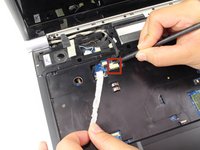
ヘビーデューティースパッジャーを使用して、天板をベースから分離します。キーボードベースとラップトップのベースの隙間にスパッジャーを最小限の力で差し込み、分離させます。パーツが分離するまで、この手順を外周に沿って進めます。
-

 FixBotに聞いてみる




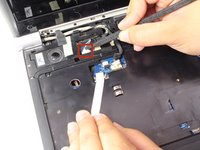
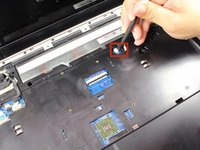


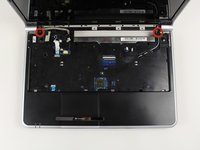
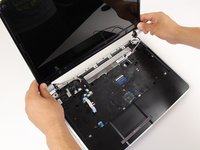


デバイスを再組み立てするには、これらのインストラクションを逆の順番に従って作業を進めてください。
10 の人々がこのガイドを完成させました。

チーム

Cal Poly, Team 7-24, Regan Spring 2014 Cal Poly, Team 7-24, Regan Spring 2014人のメンバー
CPSU-REGAN-S14S7G24
4 メンバー
104のガイドは作成済み
8件のガイドコメント
Thanks so much for your guide post. I just finished replacing the CR2032 battery on my motherboard and could not have done it without your post.
larryrchrds - 返信 共有
larryrchrds whats symptoms did your Notebook have? Mine comes up with the charging light on, power light on but no display, no fan noise. if i connect the display to another screen nothing comes up either.The computer just stoped working out of the blue. Iam wondering if you experienced the same.
I had the same issue as edson. Replaced the CMOS and works fine now. Fantastic guide. I realise this is 3 years after the comment. But might be handy for anyone else with the same problem :)
David Groom - 返信 共有
Nice guide. Same symptoms!
Robert Clapp - 返信 共有
