この翻訳は機械によって生成されたものであり、まだ人間による校正は行われていません。 日本語を話せますか? レビューはこちらから。

FixHub Webコンソールの使用方法

Nick Schultz とその他
最終更新日: 2026年10月20日
閲覧: 8382
統計データ:
- 過去24時間:
- 19
- 過去7日:
- 84
- 過去30日:
- 377
- 今までの合計
- 8,382
コメント: 8
8件のガイドコメント
修理ガイドのコメントへ完了済み: 22 23
22人のユーザーがこのガイドを「完了」させました。あなたも加わりませんか?
あなたを含む、23人のユーザーがこのガイドを使って修理を「完了」させました。素晴らしいです!
お気に入り: 3 4
3人のユーザーがこのガイドをお気に入りに登録しています。あなたもリストに入れませんか?
あなたを含む、4人のユーザーがこのガイドをお気に入りに登録しています。
はじめに
手順 1 に進む ↓パソコンを使用して、FixHubポータブル電源ステーションのファームウェアをアップデートします。
-
-
-
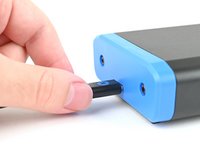
ポータブルパワーステーションをコンピュータに接続します。その際、ケーブルがパワーステーションの背面ポート(画面と反対側)に接続されていることを確認してください。
-
iFixit.com/FixHub/consoleに移動します。
 FixBotに聞いてみる
-
-
-
「Connect my device-デバイスを接続」をクリックします。
-
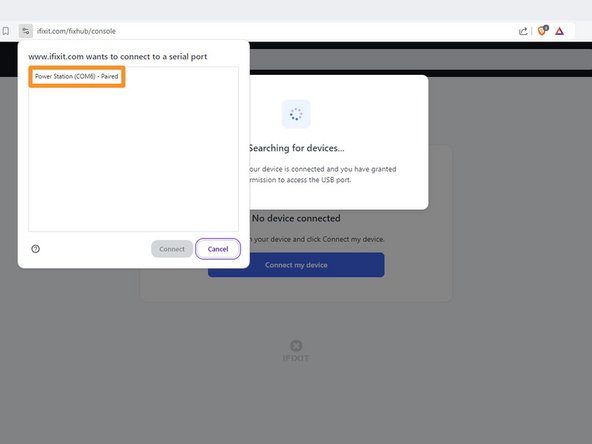
シリアルポートの接続を求めるポップアップウィンドウから、お使いのポータブルパワーステーションを選択します。
-
バッテリーが完全に消耗している場合、スクリーンに表示されないことがあります。 この手順に進んで、ブートローダーを起動してください。
-
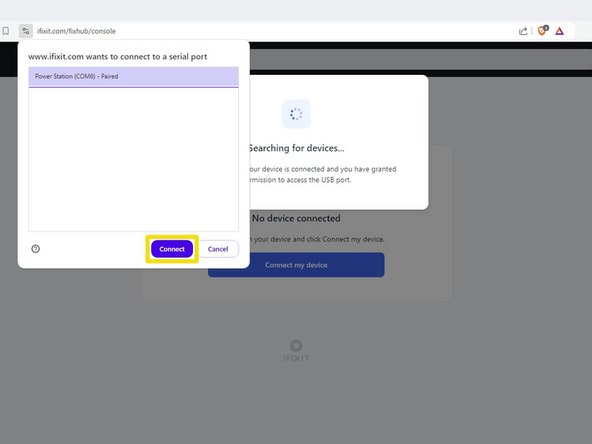
「Connect-接続」をクリックします。
-
-
-
-
USB 1 は、パワー ステーションの左フロント USB-C ポートに接続されたデバイスの情報を表示します。
-
USB 2 は、パワー ステーションの右フロント USB-C ポートに接続されたデバイスの情報を表示します。
-
Battery-バッテリー は、バッテリーのパーセンテージをリアルタイムで表示します。
-
Serial number-シリアル番号は、電源ステーションのシリアル番号を表示します。
-
Version-バージョンは、電源ステーションのファームウェアのバージョンとアップデートを表示します。
-
-
-
Version-バージョンボックスを選択します。
-
Update Now-今すぐアップデートをクリックし、ファームウェアのアップデートが完了するまで待ちます。ファームウェアのアップデート中は、電源ステーションの接続を解除したり、ウィンドウを閉じたりしないでください。
-
-
-
パワーステーションをコンピュータから取り外します
-
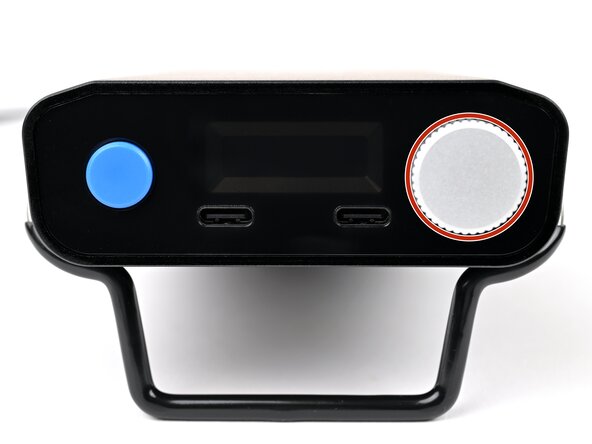
調整ノブを長押しします。
-
パワーステーションをコンピュータに再接続し、調整ノブから指を離します。
-
Webコンソールを使用して、ファームウェアを手動で更新してください。
-
-








以上です!
まだお困りですか?アンサーコミュニティで質問するか、基本的なトラブルシューティングをお試しください。
22 の人々がこのガイドを完成させました。
以下の翻訳者の皆さんにお礼を申し上げます:
100%

Midori Doiさんは世界中で修理する私たちを助けてくれています! あなたも貢献してみませんか?
翻訳を始める ›


8件のガイドコメント
Can you update the app or website to display the latest firmware release information for this device? When I plug in my hub, it only shows the current firmware version on the device but doesn't indicate if it's the latest. Unlike other options, I can't click on the box for more details. Additionally, I couldn't find any information on your website about the current firmware version or its release notes.
The web console page is: https://www.ifixit.com/fixhub/console
This is where you can browse through the current and prior firmware versions. However, I don't believe the packaged firmware (at least with CI/CD) is currently open-source at the time of writing. Yet you can see what is currently available here on GitHub: https://github.com/ifixit/fixhub (The commands here work if you're able to access the FixHub with either minicomp on Linux or PuTTY on Windows; you can determine which TTY device the FixHub is assigned to with the help of the FixHub web console, which reliably picks out the correct low-level serial device name for the FixHub.)
