メインコンテンツにスキップ
リペアコミュニティに参加 - アカウントの作成

Disassembling Nintendo DSi Bottom case

アーカイブされたガイド
このガイドは将来的な使用のためにのみ保存されてます。ご自身の修理作業には更新バージョンをご利用ください。

必要な工具と部品

  1. 注意: 手順 1-2 は、作業進行中としてマークされている ガイド から引用されています。

    Disassembling Nintendo DSi Bottom case, Battery: 手順 1、 1の画像 1
    • Loosen the two screws on the battery panel. Then lift the panel up to remove it.

    FixBotに聞いてみる
  2. Disassembling Nintendo DSi Bottom case: 手順 2、 1の画像 1
    • L Button.

    • Top of the battery pack.

    • To remove the battery pack, place your fingernail or a spudger at the top of the battery near the L button. Gently lift the battery out.

    FixBotに聞いてみる
  3. 注意: 手順 3-4 は、作業進行中としてマークされている ガイド から引用されています。

    Disassembling Nintendo DSi Bottom case, Motherboard: 手順 3、 2の画像 1 Disassembling Nintendo DSi Bottom case, Motherboard: 手順 3、 2の画像 2
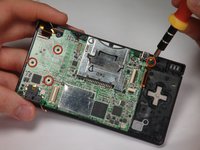
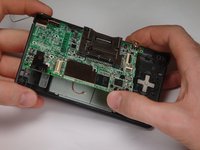
    • Remove 4 Phillips screws from the board.

    • Lift the main board from the bottom end and flip it over to reveal the last connector.

    • Keep the main board fairly close to the case, making sure not to damage the last ribbon cable holding it in place.

    FixBotに聞いてみる
  4. Disassembling Nintendo DSi Bottom case: 手順 4、 1の画像 1
    • Disconnect the ribbon cable by gently using a plastic opening tool to flip up the black connector latch. The cable should easily slide out from the connector.

    • The motherboard should now be free from the rest of the device.

    FixBotに聞いてみる
  5. Disassembling Nintendo DSi Bottom case, Bottom Case: 手順 5、 1の画像 1
    • Remove the rubber front-panel button membranes from the device. Pay careful attention to where the buttons go, so you can replace them correctly.

    • A/B/X/Y button assembly

    • Select/Start button assembly

    • D-pad

    • Power button

    FixBotに聞いてみる
  6. Disassembling Nintendo DSi Bottom case: 手順 6、 2の画像 1 Disassembling Nintendo DSi Bottom case: 手順 6、 2の画像 2
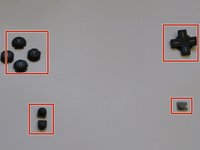
    • Remove the plastic buttons and keep them in a safe place.

    • All of the buttons have "key" notches to prevent them from being inserted incorrectly (backwards or in the wrong place), but it can take a while to figure out where everything goes if they get shuffled around.

    FixBotに聞いてみる
  7. Disassembling Nintendo DSi Bottom case: 手順 7、 2の画像 1 Disassembling Nintendo DSi Bottom case: 手順 7、 2の画像 2
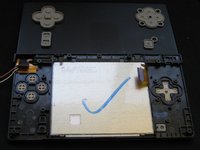
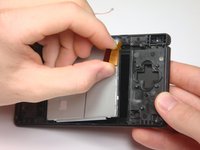
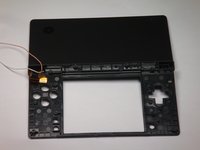
    • Flip the case open, and push the lower screen assembly out of the frame.

    FixBotに聞いてみる
終わりに

To reassemble your device, follow these instructions in reverse order.

ある他の人がこのガイドを完成しました。

作成者

15人の作成者と共同で作成されました。

rjcamero

メンバー登録日: 11/05/09

56 ポイント

3のガイドは作成済み

チーム

Cal Poly, Team 6-1, Maness Fall 2009 Cal Poly, Team 6-1, Maness Fall 2009人のメンバー

CPSU-MANESS-F09S6G1

5 メンバー

4のガイドは作成済み

0件のガイドコメント

コメントを追加

統計データ:

過去 24時間: 2

過去 7 日: 24

過去 30 日: 137

今までの合計 7,016