メインコンテンツにスキップ
リペアコミュニティに参加 - アカウントの作成

Disassembling 8BitDo Ultimate Wireless Case

必要な工具と部品

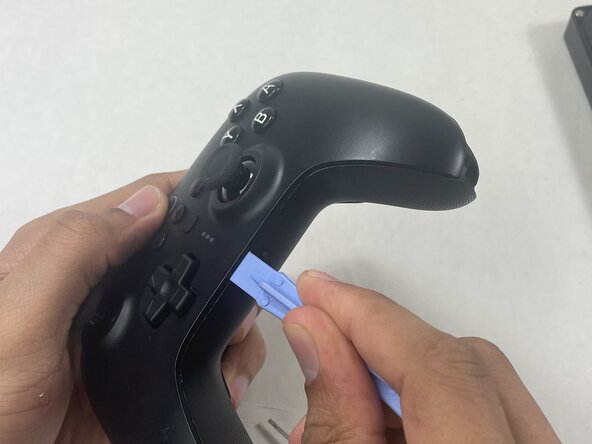
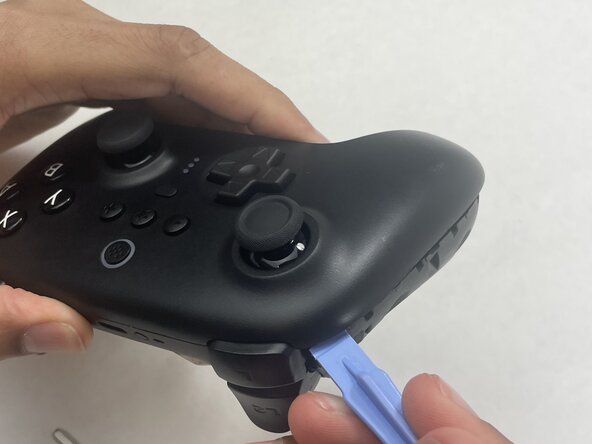
  1. Disassembling 8BitDo Ultimate Wireless Case, Case: 手順 1、 2の画像 1 Disassembling 8BitDo Ultimate Wireless Case, Case: 手順 1、 2の画像 2
    • Insert an opening pick into the seam between the left controller grip and main controller body.

    • Pry the grip off.

    • Repeat for the right grip.

    FixBotに聞いてみる
  2. Disassembling 8BitDo Ultimate Wireless Case: 手順 2、 2の画像 1 Disassembling 8BitDo Ultimate Wireless Case: 手順 2、 2の画像 2
    • Remove the six 8 mm T6 Torx screws securing the rear case to the front case.

    FixBotに聞いてみる
  3. Disassembling 8BitDo Ultimate Wireless Case: 手順 3、 3の画像 1 Disassembling 8BitDo Ultimate Wireless Case: 手順 3、 3の画像 2 Disassembling 8BitDo Ultimate Wireless Case: 手順 3、 3の画像 3
    • Insert an opening tool into seam at the bottom of the device and carefully pry the front and back shells apart.

    • Set the halves next to each other with care not to strain the connected ribbon cables.

    FixBotに聞いてみる
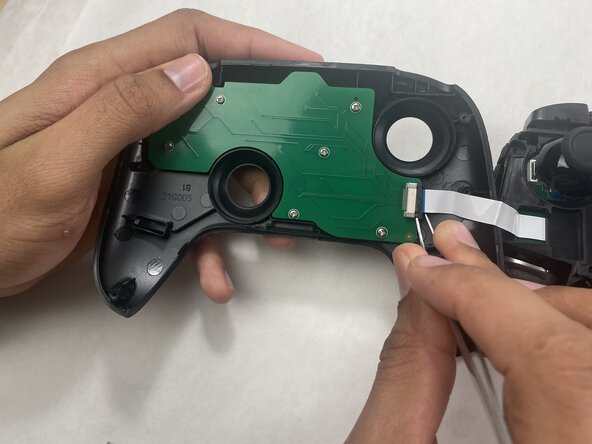
  4. Disassembling 8BitDo Ultimate Wireless Case: 手順 4、 3の画像 1 Disassembling 8BitDo Ultimate Wireless Case: 手順 4、 3の画像 2 Disassembling 8BitDo Ultimate Wireless Case: 手順 4、 3の画像 3
    • The ribbon cable is secured with a locking tab connector.

    • Use tweezers to unlock the locking tab on the ribbon cable connector, then gently disconnect the ribbon cable.

    FixBotに聞いてみる
終わりに

To reassemble your device, follow these instructions in reverse order.

Connor Bassolino

メンバー登録日: 03/29/22

23,163 ポイント

111のガイドは作成済み

0件のガイドコメント

コメントを追加

統計データ:

過去 24時間: 2

過去 7 日: 16

過去 30 日: 47

今までの合計 45