メインコンテンツにスキップ

Desktop PC GPU Replacement

必要な工具と部品

  1. Desktop PC GPU Replacement, Create an Anti-Static Work Area: 手順 1、 1の画像 1
    • Minimize exposure to items that can charge up and produce static electricity.

    • Use an anti-static wrist band.

  2. Desktop PC GPU Replacement, Turn Off Computer: 手順 2、 1の画像 1
    • Power off PC via Windows.

    • Switch off Power Supply

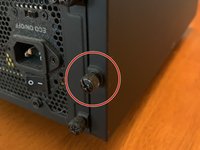
  3. Desktop PC GPU Replacement, Unscrew Case Side Panel: 手順 3、 2の画像 1 Desktop PC GPU Replacement, Unscrew Case Side Panel: 手順 3、 2の画像 2
    • Put screws where you wont lose them

  4. Desktop PC GPU Replacement, Unplug Power Connector to GPU: 手順 4、 1の画像 1
    • Be gentle to not pull with to much force when removing power cables.

  5. Desktop PC GPU Replacement, Flip GPU Lock on Motherboard: 手順 5、 1の画像 1
    • Try not to touch other components.

    • Gently pull the card out of the slot.

  6. Desktop PC GPU Replacement, Insert New GPU: 手順 7、 1の画像 1
    • Verify that the notch in the connector matches the motherboard before sliding in.

    • Carefully slide in GPU until you hear a click on the motherboard.

  7. Desktop PC GPU Replacement, Connect Power Cables: 手順 8、 1の画像 1
    • Insert wisdom here.

  8. Desktop PC GPU Replacement, Re-Attach Side Panel: 手順 9、 1の画像 1
    • Use same screws from step 2.

    • Flip power supply switch back to on.

    • Plug in PC and turn on.

    • If PC does not post go back through the steps to see if you missed something.

    • Go to manufacturer's website or use the CD that came with the card to download the latest drivers for the GPU to ensure better stability of GPU.

    • Enjoy your new GPU.

終わりに

To reassemble your device, follow these instructions in reverse order.

2 の人々がこのガイドを完成させました。

作成者

2人の作成者と共同で作成されました。

Joseph Thompson

メンバー登録日: 06/20/19

265 ポイント

1ガイドが承認済み

0件のガイドコメント

コメントを追加

統計データ:

過去 24時間: 7

過去 7 日: 31

過去 30 日: 126

今までの合計 1,447