はじめに
Computer Ram can sometimes fail and need to be replaced or need to be upgraded to a higher capacity. This guide will show how to remove the panel on the back of the laptop to access and remove the RAM.
必要な工具と部品
-
-
Locate the spring latch on the bottom of the device that will unlatch the battery.
-
Hold the spring latch in the open position and pull the battery out of its recess.
 FixBotに聞いてみる
-
-
-
-
Use a JIS 1 screwdriver to loosen the (2) captive screws from the panel.
-
Pull the panel upwards and towards the battery to remove.
-
Put the panel to the side, exposing the RAM.
-
-
-
The RAM is held by two spring clips. Pull at the two spring clips and the RAM will move upwards.
-


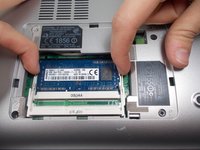
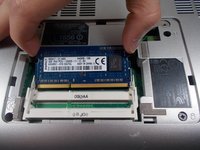
To replace the RAM, put the RAM in the now empty socket and push down on spring clips. Then replace the panel by following the instructions in reverse order.

チーム

UMass Dartmouth, Team S4-G3, Julie Fall 2017 UMass Dartmouth, Team S4-G3, Julie Fall 2017人のメンバー
UMASSD-JULIE-F17S4G3
3 メンバー
11のガイドは作成済み
