メインコンテンツにスキップ

Dell Inspiron M5110 Module Cover Replacement

必要条件のみ
これは前提条件のみのガイドです!このガイドは別の手順の一部であり、単独で使用されません。

必要な工具と部品

  1. Dell Inspiron M5110 Module Cover  Replacement, Battery: 手順 1、 1の画像 1
    • Shut down the computer and turn it upside down.

  2. Dell Inspiron M5110 Module Cover  Replacement: 手順 2、 1の画像 1
    • Slide both of the battery release latches on the bottom of the device in towards the center of the computer.

  3. Dell Inspiron M5110 Module Cover  Replacement: 手順 3、 1の画像 1
    • Slide and lift the battery up and out from the device.

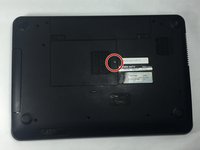
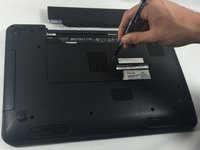
  4. Dell Inspiron M5110 Module Cover  Replacement, Module Cover: 手順 4、 2の画像 1 Dell Inspiron M5110 Module Cover  Replacement, Module Cover: 手順 4、 2の画像 2
    • Remove the 5 mm Phillips # 0 screw in the middle of the device.

  5. Dell Inspiron M5110 Module Cover  Replacement: 手順 5、 1の画像 1
    • Remove the module cover pressing in the release tabs and pulling the cover up and away from the base of the device.

終わりに

To reassemble your device, follow these instructions in reverse order.

作成者

1人の作成者と共同作成されました。

Cody Flynn

メンバー登録日: 10/18/16

334 ポイント

4のガイドは作成済み

チーム

UMass Dartmouth, Team 4-3, Catania Fall 2016 UMass Dartmouth, Team 4-3, Catania Fall 2016人のメンバー

UMASSD-CATANIA-F16S4G3

3 メンバー

8のガイドは作成済み

0件のガイドコメント

コメントを追加

統計データ:

過去 24時間: 0

過去 7 日: 0

過去 30 日: 1

今までの合計 70