メインコンテンツにスキップ
リペアコミュニティに参加 - アカウントの作成

Dell Alienware 13 Memory Module Replacement

  1. Dell Alienware 13 Memory Module Replacement, Popping out the Memory Modules: 手順 1、 3の画像 1 Dell Alienware 13 Memory Module Replacement, Popping out the Memory Modules: 手順 1、 3の画像 2 Dell Alienware 13 Memory Module Replacement, Popping out the Memory Modules: 手順 1、 3の画像 3
    • WARNING: Before working inside your computer, read the safety information that shipped with your computer and follow the steps in Before Working Inside Your Computer. After working inside your computer, follow the instructions in After Working Inside Your Computer.

    • Using your fingertips, carefully spread apart the securing clips on each end of the memory-module slot until the memory module pops up.

    FixBotに聞いてみる

    コメントを追加

  2. Dell Alienware 13 Memory Module Replacement, Removing the Memory Module: 手順 2、 1の画像 1
    • Slide and remove the memory module from the memory-module slot.

    FixBotに聞いてみる

    コメントを追加

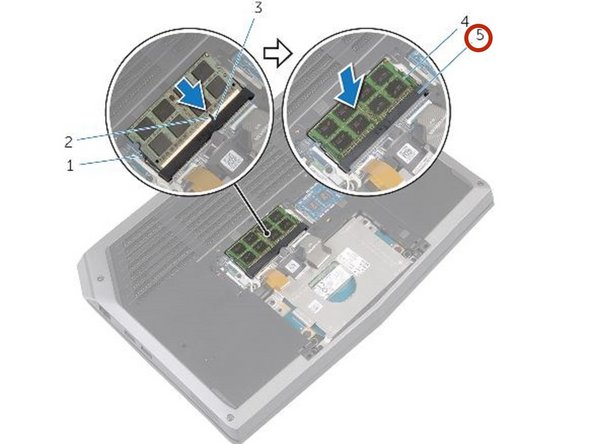
  3. Dell Alienware 13 Memory Module Replacement, Aligning the new Memory Module: 手順 3、 2の画像 1 Dell Alienware 13 Memory Module Replacement, Aligning the new Memory Module: 手順 3、 2の画像 2
    • Align the notch on the NEW memory module with the tab on the memory-module slot.

    FixBotに聞いてみる

    コメントを追加

終わりに

To reassemble your device, follow these instructions in reverse order.

キャンセル: このガイドを終了できませんでした。

作成者

1人の作成者と共同作成されました。

Terrence15

メンバー登録日: 12/18/17

80,125 ポイント

441のガイドは作成済み

チーム

RampUP America, Inc. RampUP America, Inc.人のメンバー

Community

45 メンバー

2,002のガイドは作成済み

0件のガイドコメント

コメントを追加

統計データ:

過去 24時間: 1

過去 7 日: 4

過去 30 日: 29

今までの合計 433