メインコンテンツにスキップ
リペアコミュニティに参加 - アカウントの作成

Canon PowerShot A460 Front Lens Replacement

必要な工具と部品

  1. Canon PowerShot A460 Front Lens Replacement, Battery: 手順 1、 1の画像 1
    • Slide the switch on the battery cover labeled "CARD/BATT. OPEN." to the right.

    • While still holding the switch, pull the cover down, allowing it to release and open.

    FixBotに聞いてみる

    コメントを追加

  2. Canon PowerShot A460 Front Lens Replacement: 手順 2、 1の画像 1
    • Tilt the camera slightly to allow the batteries to fall out.

    FixBotに聞いてみる

    コメントを追加

  3. Canon PowerShot A460 Front Lens Replacement: 手順 3、 1の画像 1
    • Press on and release the memory card to eject it.

    FixBotに聞いてみる

    コメントを追加

  4. Canon PowerShot A460 Front Lens Replacement, Front Casing: 手順 4、 1の画像 1
    • Unscrew the 5mm Phillips #00 screw from the bottom of the camera.

    • Make sure to keep the different size screws organized to make reassembling the camera simpler.

    FixBotに聞いてみる

    コメントを追加

  5. Canon PowerShot A460 Front Lens Replacement: 手順 5、 1の画像 1
    • Unscrew the three 2mm Phillips #00 screws that are located on the bottom of the camera.

    FixBotに聞いてみる

    コメントを追加

  6. Canon PowerShot A460 Front Lens Replacement: 手順 6、 1の画像 1
    • Remove the 4mm Phillips #00 screw that is located on the left side of the camera, if the display screen is facing you.

    FixBotに聞いてみる

    コメントを追加

  7. Canon PowerShot A460 Front Lens Replacement: 手順 7、 1の画像 1
    • Take out the 4mm Phillips #00 screw under the rubber flap on the right end of the camera.

    FixBotに聞いてみる

    コメントを追加

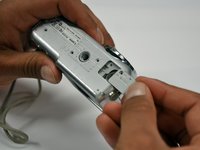
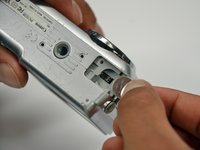
  8. Canon PowerShot A460 Front Lens Replacement: 手順 8、 2の画像 1 Canon PowerShot A460 Front Lens Replacement: 手順 8、 2の画像 2
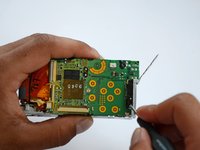
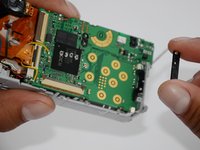
    • Remove the second battery cover on the bottom of camera.

    • Take the silver battery out of the camera.

    FixBotに聞いてみる

    コメントを追加

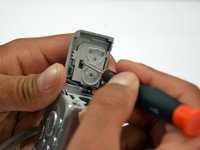
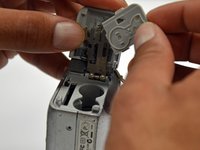
  9. Canon PowerShot A460 Front Lens Replacement: 手順 9、 3の画像 1 Canon PowerShot A460 Front Lens Replacement: 手順 9、 3の画像 2 Canon PowerShot A460 Front Lens Replacement: 手順 9、 3の画像 3
    • Remove the 4mm Phillips #00 screw on the inside of the flap that hides the battery and memory card slots.

    • Remove the light grey, plastic piece.

    • Remove the plastic portion of the battery flap cover. The metal piece will remain attached.

    FixBotに聞いてみる

    コメントを追加

  10. Canon PowerShot A460 Front Lens Replacement: 手順 10、 3の画像 1 Canon PowerShot A460 Front Lens Replacement: 手順 10、 3の画像 2 Canon PowerShot A460 Front Lens Replacement: 手順 10、 3の画像 3
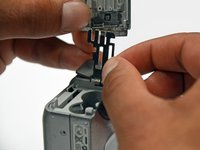
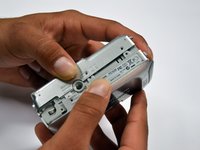
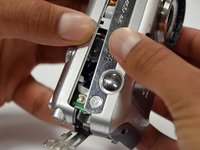
    • Slightly pull on each side of the camera. It should loosen up and come apart.

    • If it does not pull apart right away, use a little more force.

    • Do not give up!

    FixBotに聞いてみる

    コメントを追加

  11. Canon PowerShot A460 Front Lens Replacement, Back Casing: 手順 11、 1の画像 1
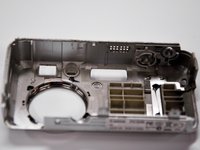
    • Remove the back case of the camera by pulling from the top.

    • Be careful when pulling off the case. There is a delicate gold ribbon connecting the bottom of the camera to the back case.

    FixBotに聞いてみる

    コメントを追加

  12. Canon PowerShot A460 Front Lens Replacement, LCD Screen: 手順 12、 1の画像 1
    • Remove the 4mm Phillips #00 screw from above the ribbon.

    FixBotに聞いてみる

    コメントを追加

  13. Canon PowerShot A460 Front Lens Replacement: 手順 13、 1の画像 1
    • Gently peel off the blue tape on the top of the LCD screen.

    FixBotに聞いてみる

    コメントを追加

  14. Canon PowerShot A460 Front Lens Replacement: 手順 14、 1の画像 1
    • Remove the 4mm Phillips #00 screw previously concealed by the blue tape.

    FixBotに聞いてみる

    コメントを追加

  15. Canon PowerShot A460 Front Lens Replacement: 手順 15、 1の画像 1
    • Gently lift the LCD screen off of the front casing by pulling up a tab on the side of the camera.

    FixBotに聞いてみる

    コメントを追加

  16. Canon PowerShot A460 Front Lens Replacement: 手順 16、 1の画像 1
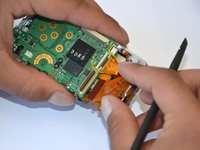
    • Using a spudger, lift the grey tabs to allow the ribbon to slide out.

    FixBotに聞いてみる

    コメントを追加

  17. Canon PowerShot A460 Front Lens Replacement: 手順 17、 1の画像 1
    • Since the tabs have been lifted, the ribbon should now slide out out easily.

    • Be careful not to distort the ribbon in any way.

    FixBotに聞いてみる

    コメントを追加

  18. Canon PowerShot A460 Front Lens Replacement, Motherboard: 手順 18、 1の画像 1
    • Remove the 5mm Phillips #00 screw located above the small black piece on the right side of the mother board.

    FixBotに聞いてみる

    コメントを追加

  19. Canon PowerShot A460 Front Lens Replacement: 手順 19、 2の画像 1 Canon PowerShot A460 Front Lens Replacement: 手順 19、 2の画像 2
    • Remove the 4mm Phillips #00 screw at the bottom of the black piece.

    • Detach the black piece that the screws previously held in place.

    FixBotに聞いてみる

    コメントを追加

  20. Canon PowerShot A460 Front Lens Replacement: 手順 20、 1の画像 1
    • Remove the 5mm Phillips #00 screw in the middle of the motherboard.

    FixBotに聞いてみる

    コメントを追加

  21. Canon PowerShot A460 Front Lens Replacement: 手順 21、 1の画像 1
    • Remove the 5mm Phillips #00 screw that holds the metal piece to the bottom of the camera .

    FixBotに聞いてみる

    コメントを追加

  22. Canon PowerShot A460 Front Lens Replacement: 手順 22、 1の画像 1
    • Remove the 5mm Phillips #00 screw that is located on the top of camera.

    FixBotに聞いてみる

    コメントを追加

  23. Canon PowerShot A460 Front Lens Replacement: 手順 23、 1の画像 1
    • Remove the 2mm Phillips #00 screw that is located on the far left of the motherboard.

    • Be careful not to damage the multiple adjacent orange ribbons.

    FixBotに聞いてみる

    コメントを追加

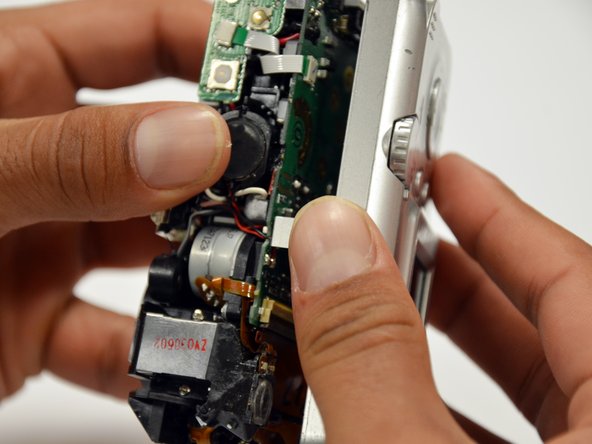
  24. Canon PowerShot A460 Front Lens Replacement: 手順 24、 1の画像 1
    • Remove the 5mm Phillips #00 screw near the bottom left of the motherboard.

    FixBotに聞いてみる

    コメントを追加

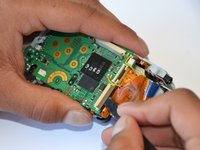
  25. Canon PowerShot A460 Front Lens Replacement: 手順 25、 2の画像 1 Canon PowerShot A460 Front Lens Replacement: 手順 25、 2の画像 2
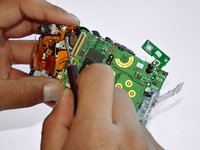
    • Using a spudger, unlock the locking mechanism that holds the lower orange ribbon in place.

    • Once unlocked, slide out the ribbon.

    FixBotに聞いてみる

    コメントを追加

  26. Canon PowerShot A460 Front Lens Replacement: 手順 26、 1の画像 1
    • Using a spudger, unlock the locking mechanism that holds the upper orange ribbon in place.

    • Once unlocked, slide out the ribbon.

    FixBotに聞いてみる

    コメントを追加

  27. Canon PowerShot A460 Front Lens Replacement: 手順 27、 1の画像 1
    • All that is required is to unsolder the few remaining wires. Then, the motherboard will be ready to be replaced!

    FixBotに聞いてみる

    コメントを追加

  28. Canon PowerShot A460 Front Lens Replacement, Front Lens: 手順 28、 1の画像 1
    • Remove the six 2mm Phillips #00 screws that are located under the motherboard.

    FixBotに聞いてみる

    コメントを追加

  29. Canon PowerShot A460 Front Lens Replacement: 手順 29、 2の画像 1 Canon PowerShot A460 Front Lens Replacement: 手順 29、 2の画像 2
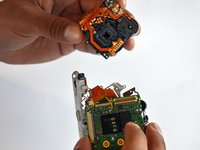
    • Remove the 4mm Phillips #00 screw that is located under the now disconnected top orange ribbon.

    • The lens piece can now be removed from the camera.

    FixBotに聞いてみる

    コメントを追加

  30. Canon PowerShot A460 Front Lens Replacement: 手順 30、 1の画像 1
    • Remove the 5mm Phillips #00 screw on the back of the lens piece.

    FixBotに聞いてみる

    コメントを追加

  31. Canon PowerShot A460 Front Lens Replacement: 手順 31、 1の画像 1
    • Remove the 2mm Phillips #00 screw on the bottom of the lens piece.

    FixBotに聞いてみる

    コメントを追加

  32. Canon PowerShot A460 Front Lens Replacement: 手順 32、 1の画像 1
    • Remove the two 2mm Phillips #00 screws on the top of the lens piece.

    FixBotに聞いてみる

    コメントを追加

  33. Canon PowerShot A460 Front Lens Replacement: 手順 33、 1の画像 1
    • Gently slide off the black piece surrounding the lens. The lens is now disassembled!

    FixBotに聞いてみる

    コメントを追加

終わりに

To reassemble your device, follow these instructions in reverse order.

キャンセル: このガイドを終了できませんでした。

4 の人々がこのガイドを完成させました。

作成者

5人の作成者と共同で作成されました。

Tanner Coleman

メンバー登録日: 01/18/13

61 ポイント

2のガイドは作成済み

チーム

Cal Poly, Team 19-42, Regan Winter 2013 Cal Poly, Team 19-42, Regan Winter 2013人のメンバー

CPSU-REGAN-W13S19G42

4 メンバー

12のガイドは作成済み

1件のガイドコメント

please put a big warning note on the step after removing the blue tape from the lens. and the next on is where you lift something on the mother board with a spluger..something like that. well i used a screwdriver and got such a big electrical shock.... scared the crapola out of me. please make a note .... can get electrical shock....

Gaby - 返信 共有

コメントを追加

統計データ:

過去 24時間: 5

過去 7 日: 17

過去 30 日: 92

今までの合計 5,516