メインコンテンツにスキップ
リペアコミュニティに参加 - アカウントの作成

Canon EOS 60D Left-Side Port Cover Replacement

閲覧: 8385

統計データ:

過去24時間:
1
過去7日:
30
過去30日:
129
今までの合計
8,385
コメント: 0

このガイドにコメントを投稿した人はいません。何かコメントはありませんか?(日本語可)

修理ガイドのコメントへ
完了済み: 8

8人のユーザーがこのガイドを「完了」させました。あなたも加わりませんか?

お気に入り: 3

3人のユーザーがこのガイドをお気に入りに登録しています。あなたもリストに入れませんか?

所要時間: 5 - 10 分
難易度: 簡単
コミュニティメンバーによる寄稿ガイド

iFixitコミュニティーの素晴らしいメンバーがこのガイドを作成しました。iFixitスタッフによって作成されたものではありません。

Canon EOS 60D Left-Side Port Cover Replacement

はじめに

手順 1 に進む ↓

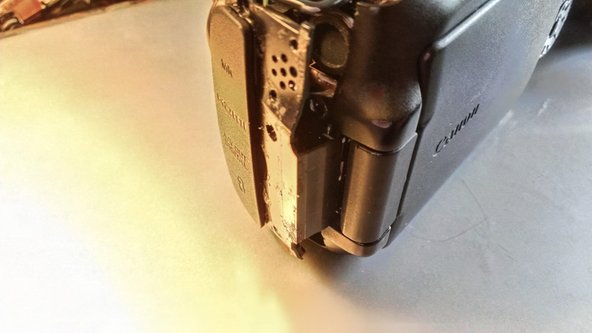
This will allow you access to the ports, or if you need to replace the dust cover, will allow you to do that.

必要な工具と部品

ツール

    1. Canon EOS 60D Left-Side Port Cover Replacement, Rubber grips: 手順 1、 1の画像 1
      • Use a thin piece of plastic, spudger, or fingernail (if you have them) to lift up the edge of the grip, and pull up slowly.

      • Repeat for the other two grips

      • The large one on the battery-side is the easiest to start with. This is required to remove the front & back panels

      • The small one on the back is a bit difficult to get started, but not really difficult to remove.

      • The one on the AV panel will be easier if you open up the AV port cover.

      • Remove the adhesive like you would rubber cement, just rub your finger against it, it will come off.

      • Optionally throw the balled up adhesive at people pretending its a booger :)

      FixBotに聞いてみる

      コメントを追加

    1. Canon EOS 60D Left-Side Port Cover Replacement, Left-Side Port Cover: 手順 2、 1の画像 1
      • Remove 3 screws

      FixBotに聞いてみる

      コメントを追加

      • Remove the small Screw under the Flip cover too

      FixBotに聞いてみる

      コメントを追加

    2. Canon EOS 60D Left-Side Port Cover Replacement: 手順 4、 1の画像 1
      • Using a Spudger, fingernail, or other thin plastic tool to wedge the panel off of the camera

      • Start at the camera's front. Pulling on the rubber av-cover may be enough to get it to move off the body

      • Only pull about 1/4" (3-5mm). There is a tab that will need to slide out

      FixBotに聞いてみる

      コメントを追加

    3. Canon EOS 60D Left-Side Port Cover Replacement: 手順 5、 1の画像 1
      • Slide the rear part of the cover out.

      FixBotに聞いてみる

      コメントを追加

    4. Canon EOS 60D Left-Side Port Cover Replacement: 手順 6、 2の画像 1 Canon EOS 60D Left-Side Port Cover Replacement: 手順 6、 2の画像 2
      • At this point, the only thing holding on is the dust-cover is hooked onto the front panel

      • Slide down to remove without damaging the cover. (see photo with cover removed)

      • You can see how the cover, and side piece fit together in the second image.

      FixBotに聞いてみる

      コメントを追加

終わりに

To reassemble your device, follow these instructions in reverse order.

キャンセル: このガイドを終了できませんでした。

8 の人々がこのガイドを完成させました。

作成者

2人の作成者と共同で作成されました。

Eric D

メンバー登録日: 11/13/12

1,377 ポイント

5のガイドは作成済み

0件のガイドコメント

コメントを追加

統計データ:

過去 24時間: 1

過去 7 日: 30

過去 30 日: 129

今までの合計 8,385