メインコンテンツにスキップ
リペアコミュニティに参加 - アカウントの作成

Blackberry Bold 9900 Back Case Replacement

必要な工具と部品

    1. Blackberry Bold 9900 Back Case Replacement, Battery: 手順 1、 1の画像 1
      • Place phone screen down.

      • Use your finger to life upward on the battery case.

      • Pull the cover away from the battery.

      FixBotに聞いてみる

      コメントを追加

    2. Blackberry Bold 9900 Back Case Replacement: 手順 2、 1の画像 1
      • Lift the edge of battery with the green stripe upward to remove battery.

      FixBotに聞いてみる

      コメントを追加

    1. Blackberry Bold 9900 Back Case Replacement, Mini-SIM removal: 手順 3、 1の画像 1
      • The Mini-SIM card is located inside the red rectangle.

      • To remove the Mini-SIM Card, push and slide the card inward towards the top of the phone. It will be ejected.

      FixBotに聞いてみる

      コメントを追加

    1. Blackberry Bold 9900 Back Case Replacement, MicroSD card: 手順 4、 2の画像 1 Blackberry Bold 9900 Back Case Replacement, MicroSD card: 手順 4、 2の画像 2
      • The MicroSD card is located where the red rectangle is shown.

      • To remove MicroSD card, push the card inward towards the top of the phone then release. The MicroSD card will be ejected.

      FixBotに聞いてみる

      コメントを追加

    1. Blackberry Bold 9900 Back Case Replacement, Keyboard: 手順 5、 2の画像 1 Blackberry Bold 9900 Back Case Replacement, Keyboard: 手順 5、 2の画像 2
      • Lift the bezel at the bottom of the phone up and peel it away from the phone.

      FixBotに聞いてみる

      コメントを追加

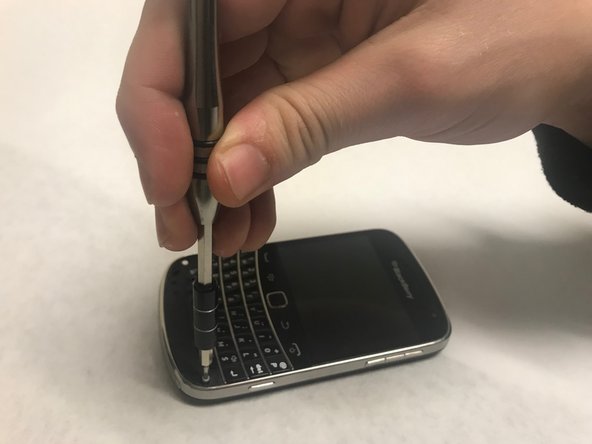
    2. Blackberry Bold 9900 Back Case Replacement: 手順 6、 2の画像 1 Blackberry Bold 9900 Back Case Replacement: 手順 6、 2の画像 2
      • Remove the two exposed screws using the T5 Torx screwdriver.

      FixBotに聞いてみる

      コメントを追加

    3. Blackberry Bold 9900 Back Case Replacement: 手順 7、 1の画像 1
      • Now lever the keyboard up using the screwdriver in the indicated hole.

      FixBotに聞いてみる

      コメントを追加

    4. Blackberry Bold 9900 Back Case Replacement: 手順 8、 2の画像 1 Blackberry Bold 9900 Back Case Replacement: 手順 8、 2の画像 2
      • The keyboard is attached via a ribbon cable. Pull the cable up to remove the keyboard.

      FixBotに聞いてみる

      コメントを追加

    1. Blackberry Bold 9900 Back Case Replacement, Back Case: 手順 9、 1の画像 1
      • Using the T5 Torx Screwdriver, remove the four torx screws that are located on the bottom half of the device

      FixBotに聞いてみる

      コメントを追加

    2. Blackberry Bold 9900 Back Case Replacement: 手順 10、 1の画像 1
      • Now, carefully and gently using your fingers, lift and remove the assembly from the back case.

      FixBotに聞いてみる

      コメントを追加

終わりに

To reassemble your device, follow these instructions in reverse order.

キャンセル: このガイドを終了できませんでした。

3 の人々がこのガイドを完成させました。

作成者

4人の作成者と共同で作成されました。

Sowmika

メンバー登録日: 01/30/18

256 ポイント

2のガイドは作成済み

チーム

Baylor, Team S1-G4, Johnson Spring 2018 Baylor, Team S1-G4, Johnson Spring 2018人のメンバー

BU-JOHNSON-S18S1G4

3 メンバー

72のガイドは作成済み

0件のガイドコメント

コメントを追加

統計データ:

過去 24時間: 4

過去 7 日: 13

過去 30 日: 47

今までの合計 2,314