メインコンテンツにスキップ

Audio-Technica AT-LP120-USB Outer Shell Replacement

必要な工具と部品

  1. Audio-Technica AT-LP120-USB Outer Shell Replacement, Outer Shell: 手順 1、 3の画像 1 Audio-Technica AT-LP120-USB Outer Shell Replacement, Outer Shell: 手順 1、 3の画像 2 Audio-Technica AT-LP120-USB Outer Shell Replacement, Outer Shell: 手順 1、 3の画像 3
    • Remove the inner steel plate that spins on the turntable.

    • Carefully lift up the plate.

    • Place it near your device out of the way.

  2. Audio-Technica AT-LP120-USB Outer Shell Replacement: 手順 2、 1の画像 1
    • Remove the power cord in the back of the device.

  3. Audio-Technica AT-LP120-USB Outer Shell Replacement: 手順 3、 1の画像 1
    • Ensure that the Tone Arm clamp is in place.

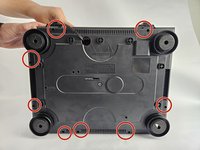
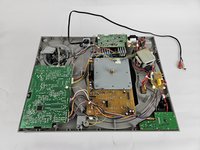
  4. Audio-Technica AT-LP120-USB Outer Shell Replacement: 手順 4、 2の画像 1 Audio-Technica AT-LP120-USB Outer Shell Replacement: 手順 4、 2の画像 2
    • Use a Phillips #2 screwdriver to remove the eight 2 mm screws holding the back casing into place.

    • Carefully remove the back casing from the device to expose the interior.

終わりに

To reassemble your device, follow these instructions in reverse order.

ある他の人がこのガイドを完成しました。

作成者

3人の作成者と共同で作成されました。

David

メンバー登録日: 10/31/24

253 ポイント

2のガイドは作成済み

チーム

Cuesta, Team 20-3, Krynen Fall 2024 Cuesta, Team 20-3, Krynen Fall 2024人のメンバー

CUESTA-KRYNEN-F24S20G3

5 メンバー

6のガイドは作成済み

0件のガイドコメント

コメントを追加

統計データ:

過去 24時間: 0

過去 7 日: 3

過去 30 日: 15

今までの合計 149