メインコンテンツにスキップ
リペアコミュニティに参加 - アカウントの作成

Asus Zenbook UX303L Battery Replacement

必要な工具と部品

  1. Asus Zenbook UX303L Battery Replacement, Battery: 手順 1、 1の画像 1
    • Ensure your device is OFF before performing this procedure.

    • Remove the eight 3 mm long screws using a T5 Torx Screwdriver.

    • Remove the single 8 mm long screw using a T5 Torx screwdriver.

    FixBotに聞いてみる

    コメントを追加

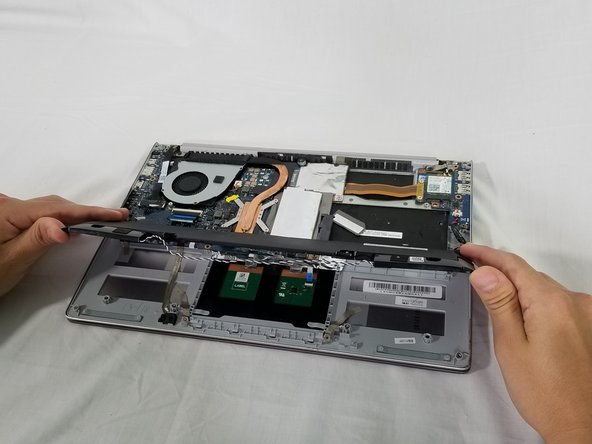
  2. Asus Zenbook UX303L Battery Replacement: 手順 2、 2の画像 1 Asus Zenbook UX303L Battery Replacement: 手順 2、 2の画像 2
    • Lift and remove the back cover.

    • If your case does not easily come free, you may need to remove screws under the plastic feet on the bottom case.

    FixBotに聞いてみる

    コメントを追加

  3. Asus Zenbook UX303L Battery Replacement: 手順 3、 1の画像 1
    • Use a Phillips #0 screwdriver to remove the four 4 mm screws from the sides of the battery.

    • Use a Phillips #0 screwdriver to remove the single 6 mm screw in the center of the battery.

    FixBotに聞いてみる

    コメントを追加

  4. Asus Zenbook UX303L Battery Replacement: 手順 4、 2の画像 1 Asus Zenbook UX303L Battery Replacement: 手順 4、 2の画像 2
    • Lift the battery connector up out of its socket on the motherboard to disconnect it.

    • A plastic opening tool can help lift the connector out of its socket. Do not pry on the socket itself or you risk damaging the motherboard.

    FixBotに聞いてみる

    コメントを追加

  5. Asus Zenbook UX303L Battery Replacement: 手順 5、 1の画像 1
    • Disconnect the speaker by carefully pulling the speaker cable away from its socket on the motherboard.

    FixBotに聞いてみる

    コメントを追加

  6. Asus Zenbook UX303L Battery Replacement: 手順 6、 1の画像 1
    • Deroute the speaker cable from the clips so the battery can be fully removed.

    FixBotに聞いてみる

    コメントを追加

  7. Asus Zenbook UX303L Battery Replacement: 手順 7、 2の画像 1 Asus Zenbook UX303L Battery Replacement: 手順 7、 2の画像 2
    • Lift up and remove the battery and speakers from the device.

    FixBotに聞いてみる

    コメントを追加

  8. Asus Zenbook UX303L Battery Replacement: 手順 8、 1の画像 1
    • Remove the speakers from the old battery.

    FixBotに聞いてみる

    コメントを追加

終わりに

To reassemble your device, follow these instructions in reverse order.

Take your e-waste to an R2 or e-Stewards certified recycler.

キャンセル: このガイドを終了できませんでした。

4 の人々がこのガイドを完成させました。

作成者

7人の作成者と共同で作成されました。

Aashray Nagpal

メンバー登録日: 04/01/19

163 ポイント

1ガイドが承認済み

チーム

IUPUI, Team S1-G6, Harley Spring 2019 IUPUI, Team S1-G6, Harley Spring 2019人のメンバー

IUPUI-HARLEY-S19S1G6

3 メンバー

7のガイドは作成済み

0件のガイドコメント

コメントを追加

統計データ:

過去 24時間: 2

過去 7 日: 22

過去 30 日: 122

今までの合計 13,815