メインコンテンツにスキップ
リペアコミュニティに参加 - アカウントの作成

Alienware M17-R1 Screen Lock Assembly Replacement

必要な工具と部品

  1. Alienware M17-R1 Screen Lock Assembly Replacement, Screen Lock Assembly: 手順 1、 1の画像 1
    • Open the screen until it is flat.

    • Ensure that the surface you are working on can support both the screen and the base of the laptop.

    FixBotに聞いてみる

    コメントを追加

  2. Alienware M17-R1 Screen Lock Assembly Replacement: 手順 2、 2の画像 1 Alienware M17-R1 Screen Lock Assembly Replacement: 手順 2、 2の画像 2
    • Remove the eight 7 mm screws around the edge of the screen using a Phillips #1 screwdriver.

    • Support the screen from the bottom to make it easier to remove the screws.

    FixBotに聞いてみる

    コメントを追加

  3. Alienware M17-R1 Screen Lock Assembly Replacement: 手順 3、 2の画像 1 Alienware M17-R1 Screen Lock Assembly Replacement: 手順 3、 2の画像 2
    • Insert the plastic opening tool and gently slide it around the edge of the screen to lift the face of the screen away from its base.

    • Be careful not to break the face of the screen when lifting it.

    FixBotに聞いてみる

    コメントを追加

  4. Alienware M17-R1 Screen Lock Assembly Replacement: 手順 4、 3の画像 1 Alienware M17-R1 Screen Lock Assembly Replacement: 手順 4、 3の画像 2 Alienware M17-R1 Screen Lock Assembly Replacement: 手順 4、 3の画像 3
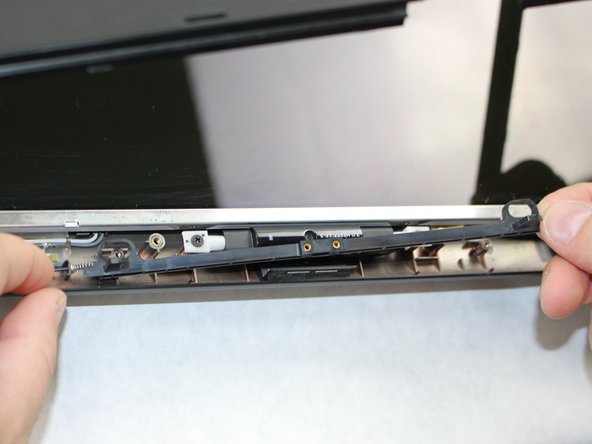
    • Remove the two 3 mm Phillips #1 screws using a Phillips #1 screwdriver.

    • Pull the assembly grip away to remove it.

    • Remove the two 5 mm screws using a Phillips #1 screwdriver.

    FixBotに聞いてみる

    コメントを追加

  5. Alienware M17-R1 Screen Lock Assembly Replacement: 手順 5、 2の画像 1 Alienware M17-R1 Screen Lock Assembly Replacement: 手順 5、 2の画像 2
    • Push in the assembly towards the spring.

    • Gently lift the slider from the side opposite to the spring and pull the slider away from the spring.

    • The spring is loosely secured to the slider and may fall off and become lost when removing the slider.

    FixBotに聞いてみる

    コメントを追加

  6. Alienware M17-R1 Screen Lock Assembly Replacement: 手順 6、 2の画像 1 Alienware M17-R1 Screen Lock Assembly Replacement: 手順 6、 2の画像 2
    • If the spring is defective, slide it off the end of the assembly and replace it.

    FixBotに聞いてみる

    コメントを追加

終わりに

To reassemble your device, follow these instructions in reverse order.

キャンセル: このガイドを終了できませんでした。

作成者

2人の作成者と共同で作成されました。

William Davis

メンバー登録日: 10/09/18

323 ポイント

2のガイドは作成済み

チーム

Sam Houston State, Team S15-G2, Blackburne Fall 2018 Sam Houston State, Team S15-G2, Blackburne Fall 2018人のメンバー

SHSU-BLACKBURNE-F18S15G2

4 メンバー

5のガイドは作成済み

0件のガイドコメント

コメントを追加

統計データ:

過去 24時間: 0

過去 7 日: 6

過去 30 日: 38

今までの合計 680