この翻訳は機械によって生成されたものであり、まだ人間による校正は行われていません。 日本語を話せますか? レビューはこちらから。

Acer Nitro 5 AN515-53-52FAバッテリーの交換

Alfredo Prieto とその他 3 人の作成者
最終更新日: 2026年8月3日
閲覧: 5167
統計データ:
- 過去24時間:
- 9
- 過去7日:
- 64
- 過去30日:
- 196
- 今までの合計
- 5,167
コメント: 8
手順に関する2件のコメント, 6件のガイドコメント
修理ガイドのコメントへ完了済み: 3 4
3人のユーザーがこのガイドを「完了」させました。あなたも加わりませんか?
あなたを含む、4人のユーザーがこのガイドを使って修理を「完了」させました。素晴らしいです!
お気に入り: 0 1
誰もこのガイドをお気に入りに登録していません。一番最初の登録者になりませんか?
1人がこのガイドをお気に入りに登録しています。あなたもそのうちの一人です!
はじめに
手順 1 に進む ↓この修理ガイドを使用して、Acer Nitro 5 AN515-53-52FAノートパソコンのバッテリーを交換します。
作業を始める前に、外部電源が接続されておらず、電源がオフになっていることを確認してください。この4セルバッテリーはデバイスの電源であり、これがなければノートパソコンは動作しません。この修理ガイドでは、バッテリーを新しいものに交換する方法を説明します。
バッテリーの減りが通常よりも明らかに早い場合は、交換が必要なサインです。バッテリーに膨らみがある場合は、直ちに安全に取り外し、信頼できる廃棄施設へ送ってください。
必要な工具と部品
修理キット
キットには、修理ガイドを完了するために必要な全ての部品とツールが含まれています。

パーツ

ツール


 FixBotに聞いてみる


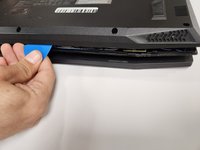
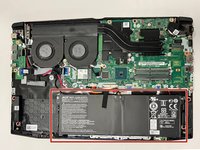


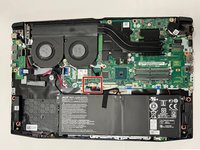
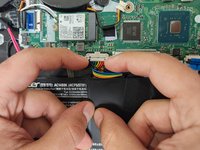


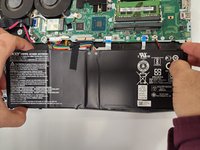
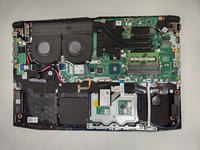
デバイスを再組み立てするには、これらのインストラクションを逆の順番に従って作業を進めてください。
3 の人々がこのガイドを完成させました。

チーム

Gateway, Team 1-3, Pee Fall 2022 Gateway, Team 1-3, Pee Fall 2022人のメンバー
GCC-PEE-F22S1G3
4 メンバー
60のガイドは作成済み
6件のガイドコメント
Do I have to use other material to put the bottom case back on or is it easy to do by hand?
SomeDude372 - 返信 共有
When I was closing it up I just put it over the components and got the screws back in and it was working fine
Can I use a Jimmy instead of the opening picks?
SomeDude372 - 返信 共有
If you're talking about the iFixIt Jimmy then I should say to be careful to not damage anything inside
I used a small standard screwdriver to "CAREFULL" separate the back plate. Suggest you have a can of air to clean the dust and crumbs off the motherboard
