メインコンテンツにスキップ
リペアコミュニティに参加 - アカウントの作成

Acer Iconia W3-810 Speaker Replacement

必要な工具と部品

  1. Acer Iconia W3-810 Speaker Replacement, Back Panel: 手順 1、 1の画像 1
    • Place the tablet face down on a flat surface with the charger facing toward you.

    FixBotに聞いてみる

    コメントを追加

  2. Acer Iconia W3-810 Speaker Replacement: 手順 2、 1の画像 1
    • Use a plastic opening tool to pry the back panel off of the device.

    • Be careful to not use the plastic opening tool near the charging dock or any media ports.

    FixBotに聞いてみる

    コメントを追加

  3. Acer Iconia W3-810 Speaker Replacement, Speaker: 手順 3、 1の画像 1
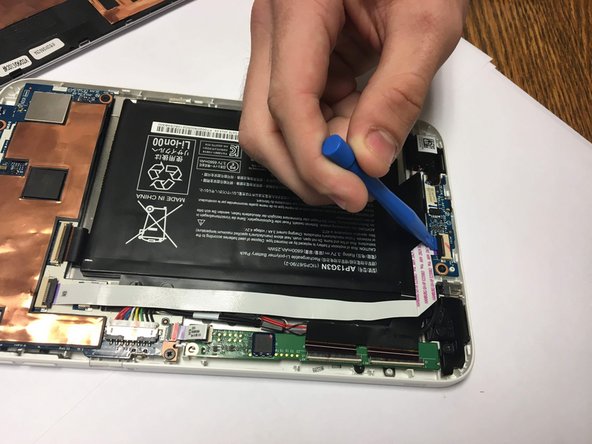
    • Lift the retaining flaps fastening the screen ribbon cord to the screen circuit board using a plastic opening tool.

    FixBotに聞いてみる

    コメントを追加

  4. Acer Iconia W3-810 Speaker Replacement: 手順 4、 1の画像 1
    • Pull the ribbon cord out of its slot.

    FixBotに聞いてみる

    コメントを追加

  5. Acer Iconia W3-810 Speaker Replacement: 手順 5、 1の画像 1
    • Lift the retaining flap fastening the ribbon cord.

    FixBotに聞いてみる

    コメントを追加

  6. Acer Iconia W3-810 Speaker Replacement: 手順 6、 1の画像 1
    • Remove the ribbon cord from its slot.

    FixBotに聞いてみる

    コメントを追加

  7. Acer Iconia W3-810 Speaker Replacement: 手順 7、 1の画像 1
    • Unscrew the Phillips head HH0 3mm screws holding down the right speaker.

    FixBotに聞いてみる

    コメントを追加

  8. Acer Iconia W3-810 Speaker Replacement: 手順 8、 1の画像 1
    • Unscrew the HHO 3mm screws holding the left speaker.

    FixBotに聞いてみる

    コメントを追加

  9. Acer Iconia W3-810 Speaker Replacement: 手順 9、 1の画像 1
    • Lift the speakers from the front panel.

    FixBotに聞いてみる

    コメントを追加

  10. Acer Iconia W3-810 Speaker Replacement: 手順 10、 1の画像 1
    • Pull the speakers underneath the headphone cord.

    FixBotに聞いてみる

    コメントを追加

  11. Acer Iconia W3-810 Speaker Replacement: 手順 11、 1の画像 1
    • Use a plastic opening tool to remove the speaker cord from its slot.

    FixBotに聞いてみる

    コメントを追加

  12. Acer Iconia W3-810 Speaker Replacement: 手順 12、 1の画像 1
    • Remove the speakers from the device.

    FixBotに聞いてみる

    コメントを追加

終わりに

To reassemble your device, follow these instructions in reverse order.

キャンセル: このガイドを終了できませんでした。

作成者

4人の作成者と共同で作成されました。

Griffin Hocker

メンバー登録日: 09/15/16

412 ポイント

3のガイドは作成済み

チーム

USF Tampa, Team 18-4, Blackwell Fall 2016 USF Tampa, Team 18-4, Blackwell Fall 2016人のメンバー

USFT-BLACKWELL-F16S18G4

4 メンバー

6のガイドは作成済み

0件のガイドコメント

コメントを追加

統計データ:

過去 24時間: 1

過去 7 日: 4

過去 30 日: 40

今までの合計 738