この翻訳は機械によって生成されたものであり、まだ人間による校正は行われていません。 日本語を話せますか? レビューはこちらから。

乾燥したプリンターカートリッジの修理方法

Hariom Godhani とその他
最終更新日: 2026年8月18日
閲覧: 6.7万
統計データ:
- 過去24時間:
- 29
- 過去7日:
- 198
- 過去30日:
- 783
- 今までの合計
- 66,528
コメント: 12
手順に関する4件のコメント, 8件のガイドコメント
修理ガイドのコメントへ完了済み: 18 19
18人のユーザーがこのガイドを「完了」させました。あなたも加わりませんか?
あなたを含む、19人のユーザーがこのガイドを使って修理を「完了」させました。素晴らしいです!
お気に入り: 1 2
1人のユーザーがこのガイドをお気に入りに登録しています。あなたもリストに入れませんか?
あなたを含む、2人のユーザーがこのガイドをお気に入りに登録しています。
はじめに
手順 1 に進む ↓プリンターを長期間使用しないと、中のインクが乾燥してしまうことがあります。乾燥したインクカートリッジが使えなくなると、多くの場合は処分して新しいカートリッジを購入しますが、これは増加する電子廃棄物(e-waste)の一因となります。乾燥したカートリッジを捨てるのではなく、この修理ガイドでは、家にあるものを使って簡単に修理する方法を紹介します。
必要な工具と部品
ツール
-
-
-
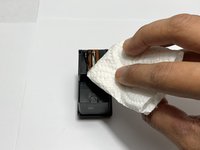
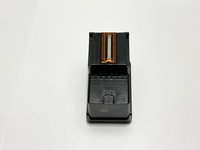
カートリッジをきれいな場所に置き、アルコールベースの手指消毒剤を数滴、インクノズルに塗布します。
-
指でインクノズルを1〜2回、優しくこすります。
-
手指消毒剤が浸透するまで数分待ちます。
-
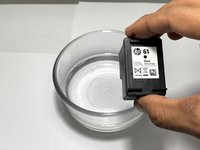
待っている間に、ボウルに温かい水道水を半分ほど入れます。
-
-
-
-
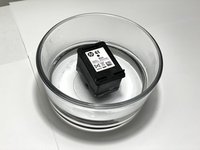
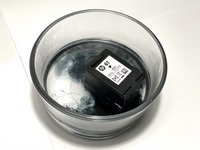
インクカートリッジのノズル側を、ぬるま湯を入れたボウルに浸します。
-
5~10分待つか、水の中にインクが溶け出してくるまで待ちます。
-
インクが溶け出してきたら、カートリッジを慎重に水から取り出します。
-


 FixBotに聞いてみる






デバイスを再組み立てするには、これらのインストラクションを逆の順番に従って作業を進めてください。
18 の人々がこのガイドを完成させました。

8件のガイドコメント
Thank you. This worked for me.
Thomas Grace - 返信 共有
Thank you 👍
Suzan Duran - 返信 共有
Tried this with HP 60 black and tri-colour cartridges, which were both brand new, sealed cartridges, but were probably sitting in the box since ~2008. It did manage to loosen the ink up enough that if I ran the nozzle along a damp coffee filter, it would leave a solid black line, or in the case of the colour cartridge, a line of 3 stripes: cyan, yellow, then magenta. Unfortunately, the moment I dry them off and pop them back in the printer, nothing happens. I did manage to get the faded mostly cyan top third of a test page once, but that was it. Repeated the process more thoroughly, and got a more consistent output of ink on the filter, but the result after that was nothing but blank sheets.
Not really sure what to do beyond this, because I could probably just pick up a new printer for the price of these cartridges. This would probably work well for newer cartridges that were printing fine, but then were just left idle for a few months too long between prints.
