はじめに
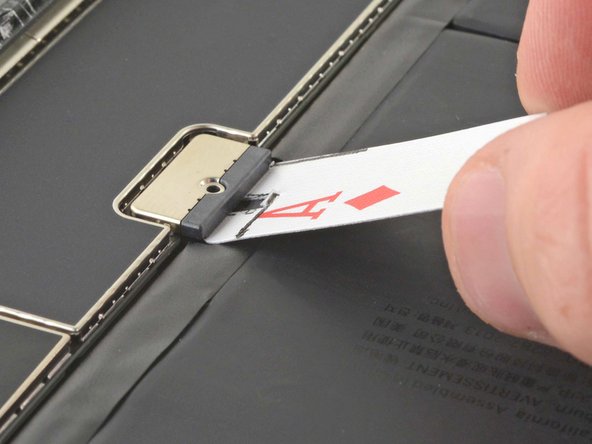
トランプを使って、iPadのバッテリーの接続を外す方法を紹介します。
iPadのロジックボード上のバッテリーコネクタの下にバッテリーブロッカーを上手く差し込めない場合は、トランプを使ってバッテリーの接続を外すことができます。この方法では、トランプをサイズに合わせてカットする必要があります。
必要な工具と部品
このデバイスを再組み立てするには、インストラクションを逆の順番に従って作業を進めてください。
18 の人々がこのガイドを完成させました。
以下の翻訳者の皆さんにお礼を申し上げます:
100%
Midori Doiさんは世界中で修理する私たちを助けてくれています! あなたも貢献してみませんか?
翻訳を始める ›
3件のガイドコメント
Thanks Robert. Great easy to create tool and excellent explanation.
Kevin Stark - 返信 共有
Hello Robert,
thank you for this useful tip.
Let me ask you this question:
I need to rectify a bent 9th gen iPad but after dismantling both the digitizer and the screen, I don't want to go further. The bent is located exactly aside the logic board screen connector.
All I want to do is try to fix the bent, therefore I need the iPad be free of movements. Since this article says the card needs to be kept in place, my question is is really mandatory that the card stays at 15 degrees or may I tape the card to the battery to avoid the card being accidentally removed?
I hope you can reply to my question.
Thank you