メインコンテンツにスキップ

モデル番号はA1706 / EMC 3071ー2017年6月発売。この13インチMacBook ProはKaby Lakeプロセッサが搭載されています。最大4.0 GHzのTurbo Boost付き3.5 GHz Core i7です。

Charging issues, is it the battery or something deeper

Was the problem solved? I have the same problem on my 2017 13" MBP, but I did well connect the battery cable (even buy another one to replace), trying again and again reset SMC, NVRAM, but it doesn't work. Looks like something wrong on the logic board...

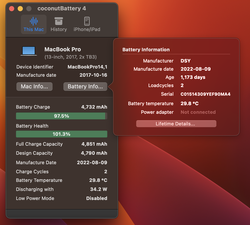
The coconut battery snapshot as below, with charger or without charger.
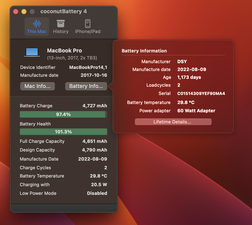
Block Image
Block Image
この質問に回答する 同じ問題があります

この質問は役に立ちましたか?

スコア 0

4 件のコメント:

@ivanwang - Did you follow the answer I provided?

Get a USB-C power meter to see if the system is accepting power. Let us know what you discover.

さんによる

Yes, I see a normal situation on charging, 20.22-20.23V, 1.5-2.xxA (about 30 W) when charging battery, when 0.7-1A(about 7-15W) when battery is not charging (100%). So I believe the battery is ok, but system board can’t switch battery / AC power normally.

さんによる

@ivanwang - OK the system is getting power, so does the system turn on with USB-C power Vs Battery alone?

Download CoconutBattery (link above) and install it and take a snapshot of the Apps main window posting it here. Go into edit mode for your post above and click on the tool icon far right picture icon upload and then click on it to post the link ID in your update post.

さんによる

@danj thanks, I’ve uploaded the coconut battery snapshot, sometimes it boot without charger but suddenly shutdown without any signal.

さんによる

コメントを追加

1 件の回答

I do see the battery temp is on the warmer side, do you live it a hot climate? If not let’s give this a try, completely shutdown the system for the night fully charged and disconnected from the charger, then in the morning take a fresh snapshot of CoconutBattery. Let’s see if the temp goes down

このアンサーは役に立ちましたか?

スコア 0

2 件のコメント:

@danj Appreciate for the comment, in fact, my location here is southern of Taiwan, and the battery temperature is very closed to the room temperature. Even now in end Oct, the temperature outside sometimes still over 30degC.

さんによる

@ivanwang - Yea, Taiwan can get quite hot and humid. Let’s stay focused on the temp as I still think that’s a signpost of the issue you are facing. So if that is your rooms ambient temp then the CPU is running much hotter!

Have you cleaned the dust and debris buildup inside? Get a small soft paint brush an a can of can’d air to loosen and then carefully blow out. Focus on the fan blades and heatsink fins at the fan as well as across the logic board and bottom cover.

I would recommend installing a good thermal monitoring App like TG Pro and lastly reduce long heavy processing Apps so the system is not as heavily taxed in your hotter climate or invest in some A/C to cool the room down better.

さんによる

コメントを追加

回答を追加する

ivan wang さん、ありがとうございました!
統計データ:

過去 24時間: 0

過去 7 日: 1

過去 30 日: 3

今までの合計 38