
メインコンテンツにスキップ

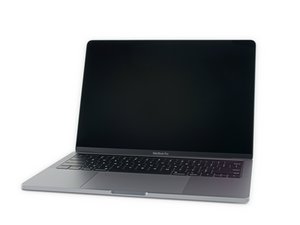
モデル番号A2159、2019年7月に発売されたエントリーレベル13インチMacBook Proの改良版モデルです。カラーオプションはシルバー、スペースグレイ。

Why does only 1 of the USB-C ports work?

I can only charge and use one of the 2 USB-C ports on the laptop. The one closest to the hinge doesn't work on this laptop. I bought a replacement USB-C part from iFixit, but still the one closest to the hinge doesn't work. It won't charge or connect to external devices like a USB hard drive.

One time when powering it on while plugged into power the machine did display a message saying:

"USB Accessories Disabled

Unplug the accessory using too much power to re-enable USB devices."

This message has only been seen once though. The laptop does however drain the battery super fast, but the battery health in settings says the battery is Normal.

Any ideas what this could be?

Added images

Block Image
Block Image
Block Image
Block Image
Block Image
Block Image
Block Image
この質問に回答する 同じ問題があります

この質問は役に立ちましたか?

スコア 1
コメントを追加

4件の回答

Other than the ribbon cable connection to the logic board from the port assembly, the logic board connector might have some damage. But it would have been there before you replaced the port assembly.

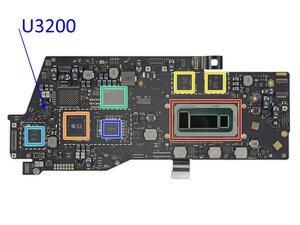
Did the system get wet around the ports? I would inspect the connector and look as best as you can around the metal shielded just behind as that’s the Thunderbolt 3 controller (marked in light blue here)

Block Image

このアンサーは役に立ちましたか?

スコア 0

7 件のコメント:

I pulled the logic board out and inspected it as closely as I possibly could, there are no signs of any water damage or any other type of damage that I can see anywhere on the board. I also took double care when putting it all back together and also cleared the NVRAM and the SMC. Still not charging with the USB-C port closest to the hinge. Is this machine just SOL? Anything else we can try or check? It wouldn't be a bad battery right? Cuz then I would think both ports would have issues.

さんによる

@barylak - At this point the given ports logic within the logic board would need checking. it’s possible someone with deep logic board repair skills might be able to repair the logic board, you could just live with only one port working, otherwise one could replace the logic board.

This is not a battery issue or anything else

さんによる

That’s what I was afraid of. It just sucks that the battery drains so fast because of the issue. Makes it a lot less usable as a mobile computer. Thanks

さんによる

@barylak - What? You didn’t tell us that! So you have a short which is allowing the power to drain. If you have a thermal camera or even use a non-contact thermometer you should be able to narrow down where the short is. it’s likely a bad capacitor.

さんによる

I mentioned in the original post that the battery drains super fast. I'm assuming this is all connected, the message saying the accessory is using too much power, the one USB-C port not working and not allowing to charge from it, while the other works, and the battery draining even when in sleep mode (lid closed). Definitely seems like something that would be difficult, I don't have a thermal camera, only a non-contact thermometer. So, i would be hunting and hoping that the thermometer picks up the temp difference while the machine is on and the bottom is pulled off?

さんによる

2件以上のコメントを表示

コメントを追加

@barylak "one closest to the hinge" means it would be the secondary port (rear left). Both ports have their own controller and it is easily possible that you are having issues with one of them. Here is the location for the one that would control that port.

Block Image

You got a multimeter? Post some really good pictures of your logic board with your Question. The controller is on the bottom side of the logic board. Let's see if we can make out things that may be the issue here.

iFixitでの質問に画像を追加する方法

Update (04/22/25)

@barylak the other controller IC is on the top side of the board.

Block Image

It is marked in orange and was identified by the iFixit team as "Texas Instruments CD3217B12 and TPS51980B (likely power controllers)"

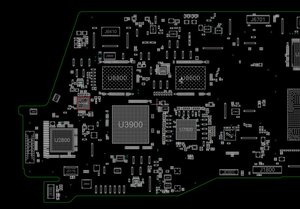
Here are the locations for the primary and secondary USB controller IC's

Block Image
Block Image

and here is the schematic for both of those as well

Block Image
Block Image

Update (04/25/25)

@barylak check the fuses F3001 and F3000 for continuity. After that you will have to check those for power as well. I've marked the points where to check with red arrows. Expectation here would be no less than at least 12VDC. Of course only do this if you are comfortable measuring these. If you have any doubts, farm it out and let somebody else fix it :-)

Block Image
Block Image

このアンサーは役に立ちましたか?

スコア 0

7 件のコメント:

There is only one controller chip in this series as noted in my answer. Reference MacBookPro 13インチ (2X Thunderbolt) 2019の分解 check Step 5

さんによる

The light blue marked IC is indeed the Thunderbolt controller IC and not the USB-C port controller. The issue described by the OP clearly deals with the USB-C and this model actually uses 2 controllers (one for each port) no matter how much one dislikes the answer.

さんによる

@oldturkey03 - Correct your text as there is no USB-C controllers here. There is only two power delivery chips.

You assume I said something I had not. And again you throw distractions! Follow a logical process, don't jump to the last logical issue (which I did state clearly was the only issue left). Knowing when to stop is also important.

Don't assume people have the skills to do micro-soldering or even have access to the needed tools or even the chip. Someone who is not experienced can easily make a mess of their system. Just because we have the knowledge and skills doesn't mean they do.

So having people dig deep into there system to diagnose the failure is helpful! One also has to also aim people to the better skilled folks that can fix their system. In the same vane you wouldn't hand a loaded gun to a kid would you?

Couch your answers so people don't over reach! Simply say this will require more advanced skills and tool to fix that it might be wise to find someone with them.

さんによる

Sorry, didn’t see these responses until today, I really appreciate the help being provided. I will try to post the best pictures I can take shortly.

さんによる

I added a bunch of pictures to the post of the thunderbolt area, and the usb ICs

さんによる

2件以上のコメントを表示

コメントを追加

Well Check the following it might help you in fixing the issue:

1. Motherboard/Case Design

2. Header Connection

3. Insufficient Power or Faulty Cable

4. Driver or OS Issue

このアンサーは役に立ちましたか?

スコア 0
コメントを追加

If one of your USB-C ports isn’t working (especially the one near the hinge), and you’ve already tried replacing the port, it’s probably a deeper issue like a damaged power delivery chip or logic board trace. Try an SMC reset first — that can sometimes fix power-related issues. But if that doesn’t help, it might need board-level repair. I had a similar issue, and only the working port was usable for charging or data.

このアンサーは役に立ちましたか?

スコア 0
コメントを追加

回答を追加する

AdamB さん、ありがとうございました!
統計データ:

過去 24時間: 5

過去 7 日: 23

過去 30 日: 103

今までの合計 512