メインコンテンツにスキップ

2015年3月のアップデートではアップルの13インチMacBook Airは第5世代Intel Core i5またはi7プロセッサーを特徴としており、これによりわずかな性能とバッテリーライフの向上がされました。

MacBook Air won't detect the battery

Hi everyone,

I have been facing a battery issue for few days now and browsing on various forums, I have not found any trick that would solve it.

My Macbook Air (13-inch, Early 2015) does not detect its battery. When the Power Adapter is plugged on the computer, it works just fine. The Magsafe turns Green for 2 seconds, then Red. I can carry on with this set up for hours without any problem. The battery just won’t charge. So I have to rely on steady power supply, and I can’t take my laptop anywhere.

As soon as I disconnect the AC charger, the computer goes to sleep or shut down. Which is not surprising since the Mac does not detect any battery, so without power the Mac shuts down.

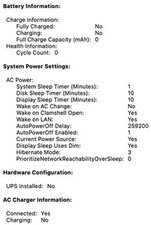
I have tried resetting the SMC and the PRAM many times, without any success. I have downloaded CoconutBattery just to further investigate and it gives me the same results as the system report : there is no battery detected.

Block Image
Block Image

One thing worth mentioning I believe is the fact that I changed the battery 2 months ago. I purchased the battery on iFixit… It worked fine for over a month and then the problem started to appear. I have changed it myself, carefully following iFixit detailed procedure. I have also tried disconnecting the battery and reconnecting it, without success as well. I have read that changing the battery could be a solution, but mine is new so I don’t think the issue is there.

What would be my options here ?

Thank you for your kind help, any detailed answer would be much appreciated.

Best regards,

Damien

この質問に回答する 同じ問題があります

この質問は役に立ちましたか?

スコア 1
コメントを追加

2件の回答

Your battery is bad! The micro-controller within it has failed.

Is this a replacement battery or the original one?

このアンサーは役に立ちましたか?

スコア 0

2 件のコメント:

Hey Dan, thank you for your reply.

I am not a hardware specialist at all. What makes you say the battery is the issue and that the micro-controller has failed?

As per your question, the battery is a replacement one, purchased from iFixit and installed end December 2021. It worked like a charm at first but then the issue started 2 weeks ago.

さんによる

@damnossub - The lack of onboard sensor data via CoconutBattery Full Charge Cap -NaN, Design Cap - Zero, Manufacturing date - Blank, macOS Batt Status - Unknown. Yet we do see SMC info Power Adapter Connected!

Contact iFixit store for a replacement battery iFixit Customer Support

さんによる

コメントを追加

Hi. I have encounter the same issue. I have a battery (16-10-24) in Transit, after ordering the wrong battery a few weeks ago.

As this is for a friend / Client (not me), the client was reporting some issue with opening his laptop. I checked it out, and I opened the laptop (it's a bit difficult) even thou I had cleaned the hinges and that area at the back of the laptop. I ALSO noticed that the battery (I purchased a new power supply off eBay) that suddenly the battery is at 100% and the laptop is working without external power..

What would be going on here? Please?

I also weeks ago did that SMC reset thing

このアンサーは役に立ちましたか?

スコア 0

2 件のコメント:

I’m confused you don’t have a replacement battery yet? The current battery is bad.

さんによる

Correct. The current Battery was Dead, not charging. Described above, green led on plug for 2 secs, then orange. Battery not charged. I even tried shutting the laptop down, and reconnect the plug. Same Result

The current (was dead) batter is in the laptop & is now operating without plug..


The replacement (I've done it again and ordered the wrong part)... Why is it I can find the correct guide and still order the wrong part?

Not a Answers Community problem ;-{

さんによる

コメントを追加

回答を追加する

Damien Busson さん、ありがとうございました!
統計データ:

過去 24時間: 0

過去 7 日: 0

過去 30 日: 12

今までの合計 314
