メインコンテンツにスキップ

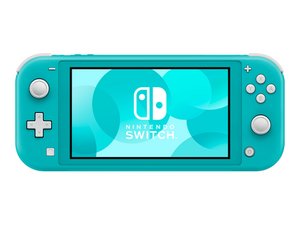
廉価版で携帯バージョン、統合されたJoy-Conコントローラと若干縮小したスクリーンを持つNintendo Switchハードウェアです。2019年9月20日発売。

Replaced left joystick and now screen doesn't work

I dropped my Switch Lite and the left joystick snapped off.

I was able to connect a Pro Controller until the replacement joysticks came in so I know the unit was working. Bought a 2 pack of replacement sticks. Neither replacement worked and now my screen doesn’t work.

Unit has power. Sound works for all of the buttons & the right stick. Even the left stick makes the boing sound when pushed in but not other sounds up/down, left/right. I only removed the daughter board when replacing the left joystick so I can’t see where/how I could have unplugged the screen.


この質問に回答する 同じ問題があります

この質問は役に立ちましたか?

スコア 3
コメントを追加

4件の回答

最も参考になった回答

The screen ribbon cable connects to the daughter board right next to the power button ribbon cable. Make sure it’s properly seated and also inspect for damage.

このアンサーは役に立ちましたか?

スコア 1
コメントを追加

How is it now? Is it fixed?

このアンサーは役に立ちましたか?

スコア 0
コメントを追加

I have this problem too, tried reseating the ribbon cable a couple times but no luck what do I do?

このアンサーは役に立ちましたか?

スコア 0
コメントを追加

I had this issue as well a couple of years ago with my Switch Lite and I got it working by taking a Q-tip and isopropyl alcohol cleaning the LCD cable to the best of my ability then making sure it was seated properly. what caused it not to work for me was that I had gotten a little bit of thermal paste on the LCD cable that i didn't notice and cleaning it helped so maybe you can give that a try.

このアンサーは役に立ちましたか?

スコア 0
コメントを追加

回答を追加する

kai mpqii さん、ありがとうございました!
統計データ:

過去 24時間: 0

過去 7 日: 8

過去 30 日: 24

今までの合計 3,136